

The Short Answer: Is Slack HIPAA Compliant?
Slack is not HIPAA compliant by default. However, Slack Enterprise Grid can be configured to support HIPAA-compliant collaboration, but only when paired with a signed Business Associate Agreement (BAA) and a strict set of security controls.
Without both of those in place, using Slack for anything involving PHI puts your organization at serious legal risk.
The importance of HIPAA-compliant Slack becomes apparent in two contexts. The first includes covered entities such as hospitals, clinics, health insurance organizations, and healthcare clearinghouses that handle patients’ data. The other context covers business associates, which include third-party service providers that process PHI on behalf of covered entities.
If your organization falls into either category and your team uses Slack, you need to know exactly what “HIPAA-compliant Slack” actually requires. It is not a single setting you toggle on. It is a combination of the right plan, a legal agreement, careful configuration, and ongoing governance.
Why Standard Slack Plans Fall Short of HIPAA Requirements
If you’re using Slack Free, Pro, or Business+, there is no path to HIPAA compliance, regardless of what settings you adjust.
Here’s why.
- First, Slack’s Terms of Service prohibit PHI on these plans. Slack’s Healthcare Supplement explicitly states: “the company does not act as a Business Associate for non-Enterprise customers, meaning Slack has no legal obligation to protect PHI, and placing patient data there violates the agreement you signed”.
- Second, these plans lack the technical controls HIPAA requires. Free, Pro, and Business+ don’t include Discovery APIs for DLP integration, custom message retention, Enterprise Key Management (EKM), or granular admin controls. These aren’t minor conveniences; they’re core safeguards under the HIPAA Security Rule.
- Third, Slack will not sign a BAA with non-Enterprise customers. A BAA is the legal contract that binds Slack to HIPAA obligations. Without it, there is no HIPAA-compliant relationship. Slack offers this agreement only to Enterprise Grid customers.
Important: Configuring privacy settings on a Pro or Business+ account does not make it HIPAA compliant. Slack’s own HIPAA documentation and Terms of Service make this explicit: Enterprise Grid is a prerequisite, and PHI is prohibited on all other plans. If your team is currently sharing any patient information on a non-Enterprise Slack plan, that is a compliance gap that needs immediate attention.
How Slack Enterprise Grid Enables HIPAA-Compliant Collaboration
Enterprise Grid is Slack’s offering targeted at big companies. This is the only Slack offering plan that can be customized to comply with HIPAA regulations. Enterprise Grid usually caters to firms with 250 or more employees, although it can be employed by smaller groups under certain conditions.
The uniqueness of Enterprise Grid lies not only in its features but also in how these are combined with other factors, making HIPAA compliance possible.
Enterprise Grid Security Features Relevant to HIPAA
Here are the features that directly support HIPAA compliance, and why each one matters:
- Encryption at rest and in transit: All customer data is encrypted at rest and in transit by default, which supports the HIPAA Security Rule’s technical safeguard requirements for PHI protection.
- Detailed audit logs: Org-level audit logs capture who accessed what, when, and from where. This is essential for demonstrating compliance during an audit and for identifying potential breaches.
- Single Sign-On (SSO) via SAML 2.0 ties Slack access to your organization’s identity provider (such as Okta, Microsoft Entra ID, or Ping), ensuring only authenticated users can access the system.
- SCIM provisioning and deprovisioning: System for Cross-domain Identity Management (SCIM) automates user onboarding and offboarding. When an employee leaves, their access is revoked, a critical control under HIPAA’s workforce management requirements.
- Enterprise Key Management (EKM): This add-on gives your organization control over the encryption keys that protect your Slack data. Using AWS KMS, you can revoke access to your data instantly if needed.
- Granular admin controls: Org Owners and Admins can restrict features, manage channels, enforce policies, and control integrations across every workspace in the organization.
Signing a Business Associate Agreement (BAA) With Slack
A Business Associate Agreement is a legal contract required under HIPAA. It establishes that Slack agrees to handle PHI according to HIPAA’s rules, including implementing appropriate safeguards, reporting breaches, and limiting how PHI is used or disclosed.
Without a signed BAA, using Slack for any PHI-related work is a HIPAA violation.
What a BAA Legally Requires From Slack and From You
A BAA creates mutual obligations. Slack must protect PHI to HIPAA standards, report any breach or unauthorized disclosure to your organization, ensure its subprocessors also meet HIPAA requirements, and return or destroy PHI at the end of the agreement.
Your organization must use Slack only in the ways described and permitted by the BAA. You must configure the platform in accordance with the Requirements for HIPAA Entities document that Slack provides. You are also responsible for training your workforce and monitoring their use of the platform.
Signing the BAA is not a green light to use Slack however you want. It establishes the legal framework. Configuration and governance are still your responsibility.
How to Request and Execute the Slack BAA
There is no self-serve process for obtaining a Slack BAA. Here is how it works in practice:
- Contact Slack’s Enterprise sales team and confirm you are on or transitioning to Enterprise Grid.
- Request the Slack Requirements for HIPAA Entities guide and review it thoroughly before signing anything.
- Identify every workspace within your Enterprise Grid organization where PHI will be processed or transmitted.
- Work with Slack’s team to execute the BAA and document the covered workspaces.
- Retain a signed copy for your compliance records and include it in your BAA inventory.
The process typically takes one to three weeks, depending on your legal team’s review timeline.
What the Slack BAA Does Not Cover
This is where many organizations get caught off guard. The Slack BAA covers Slack’s core messaging and file-sharing services, and nothing else.
It does not cover:
- Any third-party apps from the Slack Marketplace
- Patient-facing communication of any kind
- Non-message and non-file features, including user profiles, custom statuses, channel names, workspace names, and emoji
- Slack Connect channels with external organizations (those that require separate governance)
These exclusions are significant. If you connect a third-party integration that processes PHI, an EHR connector, a transcription bot, or a document tool, and that vendor has no BAA in place, you have created a compliance gap that the Slack BAA does not address.
Configuring Slack for HIPAA Compliance: Step-by-Step Setup
Getting Slack ready for HIPAA use is a multi-step process. Think of it as building layers of protection – each one addresses a different risk area under the HIPAA Security Rule.
Here is a practical walkthrough for admins.
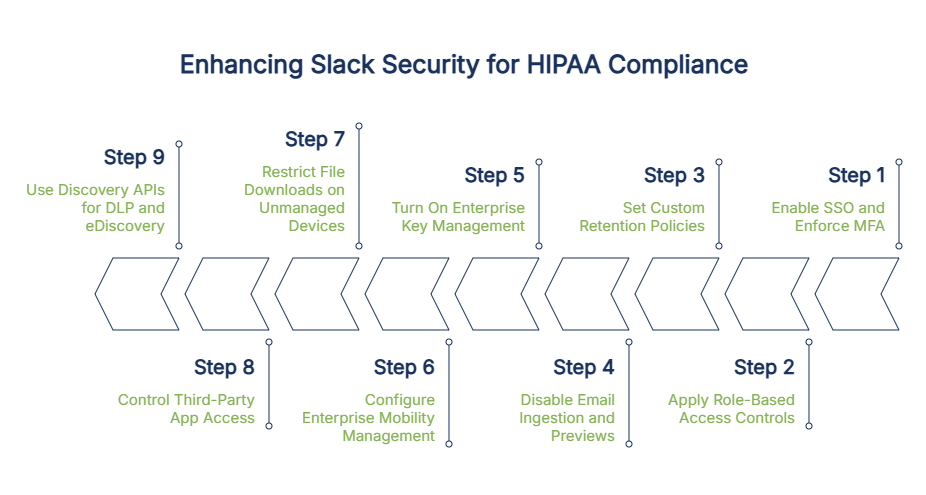
Step 1: Enable SSO and Enforce Multi-Factor Authentication
Start with access control. In your Slack Enterprise Grid admin settings, enable SAML-based Single Sign-On connected to your identity provider, then require multi-factor authentication (MFA) for all users organization-wide. This satisfies HIPAA Security Rule technical safeguards for access control (45 CFR 164.312(a)) and person or entity authentication (45 CFR 164.312(d)).
Note: For HIPAA compliance, Slack Enterprise Grid should be paired with a SAML-compatible identity provider. If your organization already uses Okta, Microsoft Entra ID, Google Workspace, or a similar solution, integration is straightforward. If not, selecting and deploying an IdP is a prerequisite you’ll need to address first.
Step 2: Apply Role-Based Access Controls and Least-Privilege Admin Permissions
Slack Enterprise Grid has a layered admin hierarchy: Org Owner, Org Admin, Workspace Admin, and regular members. Assign each person the minimum level of access they need to do their job – nothing more.
This directly reflects HIPAA’s minimum necessary standard, which requires that access to PHI be limited to what is reasonably necessary for the user’s role. Review your admin assignments regularly, and avoid granting Org Owner status to anyone who does not genuinely need it.
Step 3: Set Custom Retention Policies for Messages and Files
Retention policies control how long messages and files are kept before automatic deletion. In your admin settings, set policies at both the workspace and individual channel level.
HIPAA requires compliance-related policies, procedures, and documentation to be retained for six years under 45 CFR 164.530(j). PHI in messages, however, should be purged according to your organization’s data retention policy rather than left to accumulate indefinitely. A practical approach: create PHI-permitted channels with defined retention windows (such as 30 or 90 days), apply longer retention only where legally required, and document every policy decision in writing.
Step 4: Disable Email Ingestion and Message Previews in Notifications
Slack’s email ingestion feature allows messages to be sent into Slack via email, and push notifications can display message content on a user’s lock screen. Both features introduce compliance risk in HIPAA-configured Slack environments and should be disabled.
- Disable email ingestion. This feature is explicitly prohibited for HIPAA-compliant Slack environments because it introduces an uncontrolled data entry point. Turn it off in your admin settings.
- Turn off message content previews in push notifications. When previews are enabled, PHI can appear on a user’s lock screen, visible to anyone nearby. Disabling previews is a small change with a meaningful impact on incidental disclosure risk.
Step 5: Turn On Enterprise Key Management for Customer-Controlled Encryption
Enterprise Key Management (EKM) is an add-on for Enterprise Grid that gives your organization control of the encryption keys protecting your Slack data. Using AWS Key Management Service (KMS), your team can revoke data access instantly, for example, in response to a security incident or a departed employee.
EKM adds cost, but it is strongly recommended for organizations handling large volumes of PHI or operating in higher-risk environments. Without it, Slack controls the keys.
Step 6: Configure Enterprise Mobility Management (EMM) for Mobile Devices
Mobile devices accessing Slack with PHI create real compliance exposure, especially when personal devices are used without oversight. Slack’s native Enterprise Mobility Management (EMM) support closes that gap by enforcing your organization’s mobile security standards before Slack can be accessed.
Configure EMM settings in the admin dashboard and connect them to your existing Mobile Device Management (MDM) solution so that every mobile device accessing Slack meets your security standards, including:
- Device passcodes to prevent unauthorized access if a device is lost or stolen
- Full-device encryption to protect data stored locally on the device
- Remote wipe capability to remove Slack data from lost or compromised devices
- Integration with your existing MDM solution to enforce these policies consistently across your mobile fleet
Unmanaged personal devices accessing Slack with PHI represent a significant HIPAA risk, and EMM is how you close that gap.
Step 7: Restrict File Downloads and Screen Capture on Unmanaged Devices
Even with EMM in place, users may try to access Slack from personal devices that don’t meet your security requirements. Use Slack’s session management controls to block file downloads and exports from unmanaged devices, preventing PHI from being extracted and saved to an uncontrolled environment.
Step 8: Control Third-Party App Access
By default, users can install apps from the Slack Marketplace without admin approval. For HIPAA-compliant environments, this default must be changed immediately.
Enable the app approval workflow in your admin settings so that every app installation requires review before it is activated. Maintain an active allowlist of reviewed and approved apps. Block everything else by default.
For each app you approve, document whether a BAA is in place with that vendor, what data the app can access, and what the business justification is for using it.
Step 9: Use Slack’s Discovery APIs to Connect a DLP and eDiscovery Solution
Slack’s Discovery APIs allow external Data Loss Prevention (DLP) and eDiscovery tools to monitor messages and files in near real time. Slack’s HIPAA guidance requires organizations to implement monitoring for message and file content, either through Slack’s native DLP or an external provider connected via these APIs.
This is not optional. Native audit logs show what happened after the fact. DLP prevents PHI from being sent in the first place, or responds automatically when it’s detected.
Where PHI Leaks Happen in Slack
Configuration alone does not prevent PHI from ending up where it should not be. People use Slack naturally and quickly, and in healthcare, that often means sharing sensitive information without thinking about the compliance implications.
Here are the most common real-world leak points.
- Copy-pasted patient data in DMs and threads. A nurse sends a DM with a patient’s name and date of birth. A care coordinator pastes a member ID into a thread. These feel efficient, but DMs are still searchable, recoverable, and subject to HIPAA, and they may fall outside your retention or DLP policies.
- EHR exports, screenshots, and CSV uploads. Patient lists and screenshots pulled from the EHR for quick team review can be forwarded, downloaded to personal devices, or accessed by users who weren’t part of the original discussion. A single CSV with a few hundred patient records is enough to trigger a reportable breach.
- Slack Connect and guest account overreach. Slack Connect lets you share channels with external organizations, like vendors, referral partners, payers, or other health systems, and PHI shared there crosses organizational boundaries instantly, even if the other side lacks equivalent HIPAA controls. Guest account visibility is also often broader than admins assume.
- Public Google Drive or OneDrive links posted in channels. Slack doesn’t check the sharing permissions on linked files. A file set to “anyone with the link” is visible to everyone in the channel, now and in the future, moving PHI beyond your control without anyone realizing it.
- Custom statuses, profile fields, channel names, and emoji names. Slack’s HIPAA rules prohibit PHI in any feature outside messages and files, including statuses like “covering for [patient name],” channel names, profile fields, and custom emoji. These fields sit outside most DLP coverage.
- Huddles, Canvas, and Lists. PHI can only appear in messages and files under Slack’s HIPAA rules, so it should never be discussed in Huddles, placed in Canvas documents, or logged in Lists. These features sit outside typical DLP monitoring, which makes workforce training essential.
Rules and Limitations: What You Cannot Do With PHI on Slack
Even on a fully configured Enterprise Grid environment with a signed BAA, there are firm restrictions on how Slack can be used. These come directly from Slack’s Requirements for HIPAA Entities documentation.
No Direct Communication With Patients, Plan Members, or Their Families
Slack explicitly prohibits using its platform to communicate with patients, health plan members, or their family members, regardless of consent. Patient-facing communication must take place through a purpose-built HIPAA-compliant patient portal, telehealth platform, or secure messaging service.
If your organization has been using Slack to message patients or share appointment information with them directly, this needs to stop immediately.
Slack Is Not Your System of Record
Under HIPAA, a Designated Record Set (DRS) is the group of records used to make decisions about individuals, primarily the medical record and billing record. Your EHR is where patient information lives officially. Slack is where your team talks about it. Do not treat Slack as a backup or substitute for EHR documentation.
Restrictions on Shared Channels Between Organizations
If you use Slack Connect to share channels with an external organization, both sides need to be operating under Enterprise Grid with appropriate HIPAA configurations and their own BAAs in place. A shared channel is only as secure as its least-protected side.
Treat every Slack Connect channel involving PHI as a high-risk zone requiring specific governance.
How Slack AI Features Affect HIPAA Compliance
Newer Slack features like Slack AI, Huddles, Canvas, and Lists sit outside typical HIPAA configurations. Slack states that AI features respect user visibility, but your organization should assess how these features handle PHI and document that assessment in your Security Risk Assessment.
Third-Party App Risks: The Hidden HIPAA Gap
Many healthcare organizations configure Slack carefully, sign the BAA, and then install a handful of Marketplace apps without a second thought. This is one of the most common and costly HIPAA compliance gaps in Slack environments.
Slack’s BAA does not cover any third-party applications. When you install an app from the Slack Marketplace, you create a direct relationship between your organization and that vendor. Slack has no contractual role in that relationship and makes no representations about those apps’ compliance status. The responsibility for evaluating, contracting with, and managing those vendors falls entirely on you. If PHI flows into an integrated app without a BAA, you have a HIPAA violation, and Slack cannot protect you from it.
How to Evaluate an Integration Before Enabling It
Before enabling any Slack app that could interact with PHI, follow this four-step framework:
- Map the data flow. What data does the app access? Does it read messages, files, or user data? Could PHI reach it?
- Check for a BAA. Does the vendor offer a HIPAA BAA? If not, PHI must not flow to this app.
- Review OAuth scopes and permissions. What permissions is the app requesting? Limit access to the minimum necessary for the app to function.
- Document the risk decision. Whether you approve or reject the app, record why. This documentation supports your compliance posture if you face an audit.
Safer vs. Riskier App Categories
Not all apps carry the same risk. Use this as a general guide when evaluating Slack Marketplace integrations:
Risk Level | App Categories | Examples |
Lower Risk (less likely to touch PHI) | Apps with no message-reading access or external data processing | Simple productivity bots, calendar scheduling tools, and basic notification apps |
Higher Risk (frequently interacts with messages, files, or external data) | Apps that read, process, or transmit content outside Slack | Transcription services, file conversion tools, analytics platforms, EHR integrations, and AI assistants that read channel content |
When in doubt, treat the app as higher risk and require a BAA before enabling it.
Building an App Governance Program
Default-deny is the right posture for HIPAA environments. Block all app installations by default, require admin approval for each one, and document the OAuth scopes each approved app uses.
Revisit your app inventory at least quarterly. Vendors change their permissions, update their terms of service, and are sometimes acquired by larger companies. An app that was low-risk when you installed it may not be low-risk a year later.
Why DLP Is the Missing Piece of Slack HIPAA Compliance
Many organizations complete their Slack Enterprise Grid setup, check the audit logs occasionally, and consider the job finished. In reality, that is only the beginning.
Slack’s built-in controls are largely reactive. Audit logs record what happened after the fact; they do not prevent PHI from being sent in the first place. HIPAA’s Security Rule requires proactive safeguards, and that is exactly what a Data Loss Prevention (DLP) tool provides.
Consider a practical scenario: if a staff member pastes a patient’s medical record number into a direct message, the audit log simply records the event. A DLP tool connected to Slack can detect that same action in near real time and respond automatically, for example, by alerting the compliance team or removing the message before it spreads. HIPAA does not just ask you to know what went wrong. It asks you to prevent it.
How DLP Integrates With Slack
Slack provides a secure connection, known as the Discovery API, that allows approved third-party monitoring tools to scan messages and files as they are sent. The DLP tool checks content against your policy rules, looking for patient identifiers or other sensitive health data, and takes action based on what it finds. The result is a live compliance layer that sits on top of Slack without disrupting how your team works.
What a HIPAA-Ready DLP Should Detect and Do
A properly configured DLP tool should be able to identify the following categories of sensitive data, though capabilities vary by vendor:
- Medical Record Numbers (MRNs)
- Social Security Numbers
- Diagnosis codes (such as ICD-10)
- Insurance member IDs
- Dates of birth in common formats
- Medical diagnoses and treatment language
The more accurate your detection rules, the fewer incorrect alerts your team has to review.
When the DLP detects a possible PHI exposure, it can respond in several ways depending on your policy settings:
- Notify the user with a reminder that PHI should not appear in that channel
- Alert the compliance team for human review
- Hide the message pending review
- Delete the message automatically
- Block a file before it is shared
Match the response to the sensitivity of the channel and the severity of the violation.
Audit Trails for OCR Readiness
If the Office for Civil Rights (OCR) investigates your organization, whether through a formal audit or a complaint-driven review, documentation is non-negotiable. Your DLP tool should produce a full, exportable record of PHI-related events, policy violations, the actions taken, and when each occurred.
Combined with Slack’s native audit logs, your signed BAA, and your Security Risk Assessment records, this gives you a complete file you can present to an auditor with confidence.
What Happens When a HIPAA Violation Occurs on Slack: Real Enforcement Risk and Penalties
This section is not hypothetical. Healthcare organizations face real financial and reputational consequences when PHI is exposed, even through familiar tools like Slack. Here is what is at stake under the 2026 enforcement rules.
The 2026 HIPAA Civil Monetary Penalty Tiers
As of January 28, 2026, HHS updated HIPAA civil monetary penalties through its Annual Civil Monetary Penalties Inflation Adjustment, published in the Federal Register.
Tier | Description | Minimum Per Violation | Maximum Per Violation | Annual Cap |
Tier 1 | No knowledge | $145 | $73,011 | $2,190,294 |
Tier 2 | Reasonable cause | $1,461 | $73,011 | $2,190,294 |
Tier 3 | Willful neglect (corrected) | $14,618 | $73,011 | $2,190,294 |
Tier 4 | Willful neglect (not corrected) | $73,011 | $2,190,294 | $2,190,294 |
The difference between Tier 1 and Tier 4 often comes down to whether you have documented policies, trained your staff, and taken corrective action. Organizations that cannot demonstrate those steps face the steepest penalties.
What OCR Looks For During an Audit Involving Slack
If OCR reviews your organization’s use of Slack, expect them to request:
- A signed Business Associate Agreement between your organization and Slack
- A completed Security Risk Assessment (SRA) that includes Slack as a covered system
- Documented retention policies for Slack messages and files
- Workforce training records confirming staff completion of HIPAA training for Slack use
- Audit logs demonstrating ongoing access monitoring
- An inventory of third-party Slack apps, including applicable BAAs with each vendor
- Incident response records for any PHI-related events involving Slack
If these documents cannot be produced, the absence of evidence becomes evidence of neglect.
The Breach Notification Rule
Under the HIPAA Breach Notification Rule (45 CFR 164.400–414), any PHI exposure through Slack, whether a message sent to the wrong channel or an unauthorized app accessing files, triggers notification obligations based on the size of the breach.
For breaches affecting 500 or more individuals, you have 60 days from discovery to notify affected individuals, HHS, and prominent media outlets in any affected jurisdiction. For breaches affecting fewer than 500 individuals, affected individuals must still be notified within 60 days, but HHS notification can be submitted by the end of the calendar year.
In every case, the 60-day clock starts when the incident is known or reasonably should have been known, not when the investigation concludes.
The Reputational and Operational Cost Beyond Fines
Financial penalties are only part of the picture. Organizations that face OCR enforcement often enter into Corrective Action Plans (CAPs), which require mandatory monitoring, external reporting, and documented improvements over periods of one to three years.
Beyond the regulatory consequences, a public breach involving patient data causes lasting damage to patient trust, drives up cyber liability insurance premiums, and can trigger state attorney general investigations under HITECH. The full cost of a breach, across investigation, notification, legal fees, public relations management, and operational disruption, consistently exceeds the fine itself.
Keeping Slack Compliant Long-Term
Setting up Slack correctly is a strong start. Keeping it compliant over time is the harder part. Compliance is a continuous process, not a project you complete once and move on from.
Channel Naming Conventions That Signal PHI-Permitted Spaces
Not all Slack channels carry the same risk. Create a clear naming convention that signals to your workforce which channels are PHI-permitted and which are not. For example:
- phi-care-coordination – a PHI-permitted channel for care team communication
- phi-billing-inquiries – a PHI-permitted channel for billing discussions
- priv-hr-general – an internal, private channel with no PHI
- pub-all-staff-updates – a public, organization-wide channel for general announcements
Clear naming reduces confusion and makes it easier to apply the right DLP policies to the right channels.
Keeping Access Lists Up to Date
Conduct a formal access review at least every quarter. Confirm that every active user still needs their current level of access, and remove access for anyone who has changed roles or left the organization.
Connect your SCIM integration to your HRIS so that employee departures trigger automatic Slack deprovisioning. Also, audit guest accounts regularly; external users often retain access well beyond the end of their engagement.
Training Workforce and Keeping Records
Every employee who uses Slack for work involving PHI needs HIPAA-specific training before they are granted access. Training should cover what PHI is, which Slack features are permitted for PHI, what the prohibited fields are, and what to do if they suspect a disclosure has occurred.
Conduct annual refresher training and provide role-specific guidance for admins and power users. Keep completion records for every training session. OCR will ask for them.
Periodic BAA Inventory Reviews
Maintain a living document that lists every active BAA (Slack), every approved Marketplace app, and every integrated service that could touch PHI. Include the BAA effective date, the renewal or review date, and the scope of coverage.
Review this inventory every quarter. Remove any app that lacks a BAA but is potentially interacting with PHI. Renew BAAs before they expire.
Planning for Incidents
Document a clear, step-by-step response plan for Slack-related PHI incidents. Your runbook should cover:
- How to revoke a compromised user’s Slack access immediately
- How to pull audit logs for a specific time period or channel
- How to quarantine or delete messages through your DLP tool
- How to notify your compliance officer and legal team
- How to preserve evidence for breach investigation and potential OCR reporting
A runbook that lives in a shared document is far more useful in a real incident than guidance buried in a policy manual.
When Slack Is the Wrong Choice: Healthcare Teams
Slack is a powerful tool, but it is not the right solution for every healthcare communication need. Being honest about its limitations helps you make better decisions.
If your team needs to communicate directly with patients, Slack is not an option. Patient-facing communication must happen through a purpose-built platform.
If your organization is a small clinic or independent practice without the budget or user volume for Enterprise Grid, the cost-benefit calculus may simply not work. Slack Enterprise Grid is priced for larger organizations, and the additional investment required for EKM, DLP, and SSO infrastructure can be substantial.
If your work involves heavy cross-institutional collaboration with partners who are not on Slack or who are on non-Enterprise plans, the complexity of governance for Slack Connect channels may outweigh the convenience.
Categories of Alternatives
If Slack isn’t the right fit for your team, there are purpose-built alternatives worth considering.
Use Case | Alternative | Key Feature |
Clinical team communication | HIPAA-native with HITRUST CSF certification | |
Patient-facing messaging | Purpose-built for practice-to-patient communication with an automatic BAA | |
Messaging inside EHR workflows | Built into the EHR’s existing HIPAA framework | |
Open-source, self-hosted flexibility | Rocket.Chat (Matrix-compatible federation) | On-premise deployment with full data control |
How ComplyAssistant Helps Healthcare Organizations Use Slack With Confidence
HIPAA compliance is ongoing work: risk assessments, policy management, workforce training, BAA tracking, and vendor oversight, all happening at the same time. ComplyAssistant was built to carry that load for healthcare organizations.
Founded in 2002 as a HIPAA consulting firm and now a dedicated healthcare GRC software company, ComplyAssistant supports more than 100 healthcare organizations across the United States with:
- HIPAA compliance software to manage your full compliance program in one place
- Healthcare policy management software for creating, updating, and distributing policies across your organization
- Vendor risk management software to track BAAs and evaluate every third-party that touches PHI
- Healthcare audit management software to stay prepared for internal and external audits
- HIPAA consulting services covering Security Risk Assessments, policy development, workforce training, and BAA management
- Virtual CISO (vCISO) services for organizations that need ongoing cybersecurity leadership
Whether you need help with a Security Risk Assessment, BAA/Vendor management, policy development, or ongoing compliance support, contact the ComplyAssistant team to discuss your organization’s needs.
Wrapping Up!
Slack can be HIPAA compliant, but only on Enterprise Grid, only with a signed BAA, and only with the right configuration and ongoing governance. All three conditions must be present, and they must be maintained continuously.
Configuration sets the foundation. The BAA establishes the legal relationship. But real compliance is what happens every day after that, in how your team uses the platform, how quickly you respond to incidents, and how thoroughly you train your workforce. Tools do not create compliance. People, policies, and oversight do.
If you are not sure where your organization stands, start with a Security Risk Assessment that includes Slack as a covered system. Then work through the configuration steps in this guide. And if you want expert support along the way, the ComplyAssistant team is here to help.
FAQs
Can I use Slack on the Free or Pro plan for any healthcare-related work?
You can use Free or Pro Slack for general internal communication that does not involve PHI – scheduling meetings, sharing project updates, or coordinating non-clinical tasks. However, Slack’s Terms of Service explicitly prohibit PHI on non-Enterprise plans, and no BAA is available on these tiers. Any healthcare-related use involving patient information requires Enterprise Grid.
Does Slack encrypt messages end-to-end?
No. Slack encrypts data in transit and at rest, but it holds the encryption keys, meaning Slack can technically access message content. Organizations on Enterprise Grid can add Enterprise Key Management (EKM) to control their own encryption keys, which is the closest option to customer-controlled encryption in Slack.
Can we use Slack to text patients if we get their written consent?
No. Slack’s HIPAA requirements explicitly prohibit using the platform to communicate with patients, health plan members, or their families, regardless of consent. Patient-facing communication must take place on a separate, purpose-built HIPAA-compliant platform, such as a secure patient portal or a healthcare messaging application designed for that use case.
Is Slack HITRUST certified?
Slack does not hold a standalone HITRUST CSF certification, but it does hold SOC 2 Type II, SOC 3, and ISO 27001 certifications. HITRUST is not a HIPAA requirement, but if your organization requires it from vendors, flag this with your compliance team.
What happens to PHI in Slack if an employee leaves the organization?
With SCIM-enabled provisioning, a departing employee’s Slack access is revoked automatically when their account is deactivated in your identity provider. Any PHI in their past messages remains in Slack and is subject to your retention policy. As part of offboarding, admins should also initiate a remote sign-out across all devices and review the employee’s recent channel and DM activity.
How long does it take to configure Slack Enterprise Grid for HIPAA?
For a mid-sized healthcare organization, the full process typically takes two to six weeks. This covers BAA execution, SSO and EMM setup, DLP integration, retention policy decisions, workforce training, and documentation. Organizations with more complex infrastructure or multiple workspaces should plan for additional time.
Do we still need a separate DLP tool if we have Slack Enterprise Grid?
Yes. Slack’s Discovery APIs exist precisely so that external DLP providers can be connected. Slack’s own HIPAA guidance explicitly requires organizations to implement DLP monitoring either through Slack’s native DLP offering or through a third-party provider. Native audit logs record what has already happened; DLP tools prevent or respond to policy violations in real time. Both are necessary for a HIPAA-grade Slack environment.
What’s the difference between Slack being a Business Associate and being HIPAA compliant?
Slack becomes a Business Associate when your organization signs a BAA, giving Slack legal obligations to protect your PHI. Being HIPAA compliant is about how your organization configures and uses Slack every day. One is Slack’s legal status; the other is your operational responsibility. Both matter, and neither substitutes for the other.
